If you aren't familiar with Make the Cut software I would highly recommend that you go to their website to learn more about it. You can find it at http://www.make-the-cut.com/. It allows you to do so much with your die cutter. You will be amazed. You are limited only by your imagination!! You can check out their forums for more great ideas. The best news is that Andy, the developer, is about to release the official new version 3 which adds so many more great features to this amazing software.
A Place to share my Cricut files as well as .mtc, .svg and/or .scut files I created for use with Make the Cut and/or SCAL and My electronic Die Cut Machine. I use a Cougar cutter as well as my Cricuts.
Some Basic Information About My Site and My Files:
First a note about my files:
All my files are for personal use. I do not charge for any files I create. I share them here for others to use for personal use only. Please do not use them to submit for contests, etc. without getting my permission first. Please give credit where credit is due. I will try to do the same. This means I will try to identify where I got an item or a project if I didn't create it myself and there is an identifable source. Sometimes however I use basic clipart or coloring pages. You may however share these files with others for their personal use (you may not charge for them - you may pass them on for free) or you may point them here to my blog to get the files themselves. If a download file is available, it will appear at the bottom of the post and will be in a different color text.
PLEASE NOTE: I reside in the USA where we use the MM/DD/YYYY date format on computers (and in everything else we do!) If you are outside the USA where they use the DD/MM/YYYY date format on computers, you MAY experience an "Unhandled exception" error when you try to open one of my Cricut DS files. It is an error related to the date format. An easy fix is available at SusanBlueRobot's Blog. Susan has a simple HexEdit program and directions which will allow you to alter the date so you can use the files. Note: This is only an issue if the save date of the file is after the 12th of the month! It is also only an issue with DS files. I have never seen this issue with MTC or SCAL.
All my files are for personal use. I do not charge for any files I create. I share them here for others to use for personal use only. Please do not use them to submit for contests, etc. without getting my permission first. Please give credit where credit is due. I will try to do the same. This means I will try to identify where I got an item or a project if I didn't create it myself and there is an identifable source. Sometimes however I use basic clipart or coloring pages. You may however share these files with others for their personal use (you may not charge for them - you may pass them on for free) or you may point them here to my blog to get the files themselves. If a download file is available, it will appear at the bottom of the post and will be in a different color text.
PLEASE NOTE: I reside in the USA where we use the MM/DD/YYYY date format on computers (and in everything else we do!) If you are outside the USA where they use the DD/MM/YYYY date format on computers, you MAY experience an "Unhandled exception" error when you try to open one of my Cricut DS files. It is an error related to the date format. An easy fix is available at SusanBlueRobot's Blog. Susan has a simple HexEdit program and directions which will allow you to alter the date so you can use the files. Note: This is only an issue if the save date of the file is after the 12th of the month! It is also only an issue with DS files. I have never seen this issue with MTC or SCAL.
Tuesday, December 7, 2010
Intricate 3-D Christmas Tree
Friday, November 12, 2010
Purse Gift Card Holder
Hello. I've been working on this file and had meant to get it up earlier this week. I had my crafting buddies (Names in ( ) are names used on CricutMB), Rheba (DazyCutr), Margaret (mlharrell) and Kristen (KristenLong) try my files out on Tuesday. They seemed to work for them. Then I had to find time to do all the work needed to get them on the blog to share. That can be a time consuming process! LOL Then I had a busy week with other stuff so here it is Friday and I think I am ready to put these up. I an uploading a pdf file showing the score lines. However, PLEASE NOTE, the score line file is NOT to scale. It couldn't be to get it on a printable 8 1/2"x11" sheet of paper. It is for visual use only. One day I will get down putting score lines in my projects themselves. Jsut haven't gotten there with this one sorry! LOL
However, I thought that most people would prefer to use the 12x12 mat and 12x12 paper so with some work, I was able to create a file that cuts separate pieces that you need to glue together. There are really only 2 parts that you have to cut, but the file does have a back "overlay" piece for those anal people who don't want the "overlap" of the two pieces showing. You can overlap the two pieces either on the inside or on the outside (this looks good if you use contrasting patterned paper for the top and bottom pieces!)
Without further ado, here are my files. There are files for Make the Cut (MTC) and .svg for those with other software and/or cutters. I created my original files in MTC and then exported them out to .svg.
Download the Large Mat (12x24) 1 Piece Make the Cut (.mtc) cut file here.
Download the Small Mat (12x12) 2 piece Make the Cut (.mtc) cut file here.
Download the Large Mat (12x24) 1 Piece .svg file here.
Download the Small Mat (12x12) 2 piece .svg file here.
Download the .pdf file showing the score lines here.
Download the .pdf file showing the glue lines for the 2 piece file here.
The handle of the purse can either be made in a couple of ways. The one I saw basically used a pipe cleaner and did not put holes but just put it around the sides and folded it inside. I punched small holes and used pipe cleaners and or small wire and added some cheap beads I had just to see how that would look. Feel Free to use your imagination!! I only show pics of ones wit the beads. The pipe cleaners also worked well. Then you put a piece of velcro to hold the purse flap down.
Thanks for stopping by. Please show me what you make with the files. I love to see that people actually use my files! LOL Pictures of mine are just "rough mockups" of the files to make sure that they really work! Would love to show some really blinged out! Hopefully with the pics and the .pdf files you will be able to figure out how to put this together. If not, please leave me a comment with any questions. Leave your email if I need to contact you. I will not publish the email address.
Friday, November 5, 2010
Volleyball Window Cling and Volleyball .svg and .mtc files
![]() |
| Original Window Cling Using DS and Sports Mania Cart |
Recently, I had several new inquires looking for the Volleyball cut file from people who did not have either a Cricut and/or Design Studio or a Gypsy. Since the volleyball I originally used was a copyrighted file from the Sports Mania cartridge, I couldn't use it to quickly make another file type to share with you. Several said they had searched for an .svg file to use but had not had any success. I too searched for one and didn't find one so I have created two new and different files using two basic shapes, a circle and a ( !
| "Full" Volleyball .mtc or .svg file available |
As a result, there are several different files and formats available for download. I originally didn't share my Design Studio .cut file as I thought it was simple to recreate. However, several people needed help with that as well. Therefore I am also now sharing my original volleyball file created in Design Studio (DS) using the Sports Mania Cartridge and Basecamp for the font and have also converted it to a .gypsy file for those without DS but with a Gypsy. I have also created Make the Cut (.mtc) files and then exported those out to .svg files for people with SCAL and/or other software or cutters. So hopefully, there is something here that you can use. LOL
| Window Cling with Blank area for personalization by you .mtc or .svg file available |
I hope that someone finds some use for these files. As always, I appreciate any comments and especially those who take the file and actually do somethimg with it and then come back and let me know so I can come take a look! Those have been extremely rare but greatly appreciated!
You can see my original post showing the football and volleyball here.
Download the Design Studio (DS) Volleyball Decal .cut file using Sports Mania and Basecamp Cartridges. Replace my child's name and school name with your's or modify as you desire. I used the Hide Contour feature to hide the lines not wanted on the ball.
Download the Gypsy Volleyball Decal .gypsy file using the Sports Mania and Basecamp Cartridges. Replace my child's name and school name with your's or modify as you desire. I used the Hide Contour feature to hide the lines not wanted on the ball.
(Note: Basecamp was the font I used for my child's & school's name - you can use any font cart).
Download the full Volleyball Make the Cut (.mtc) file. This is a complete ball with all lines in the middle.
Download the full Volleyball .svg file. This is a complete ball with all lines in the middle.
Download the Volleyball Window Cling for Make the Cut (.mtc) file. This ball has lines missing in the middle to add your child's name, number and/or school or club name, etc.
Download the Volleyball Window Cling .svg file. This ball has lines missing in the middle to add your child's name, number, and/or school or club name, etc.
As always, leave me a comment if you have questions, problems or simply want to say Thanks! Thanks for stopping by!
Labels:
.cut file,
.gypsy file,
.mtc,
.svg,
SCAL,
vinyl,
volleyball,
window cling
Wednesday, November 3, 2010
Circus Party Invitation or Card
| "Closed Card" with pullout tab |
| Regular Card with no tab |
Sorry. Circus Week was interrupted by a trip out of town to our State's High School Volleyball Tournament last week with my DD and her team. They came in 3rd! Not what they hoped for, but still a great showing!! Then I have been trying to catch up on being gone for most of the week last week! Now club VB tryouts have begun and DS has finished football and Basketball has begun!
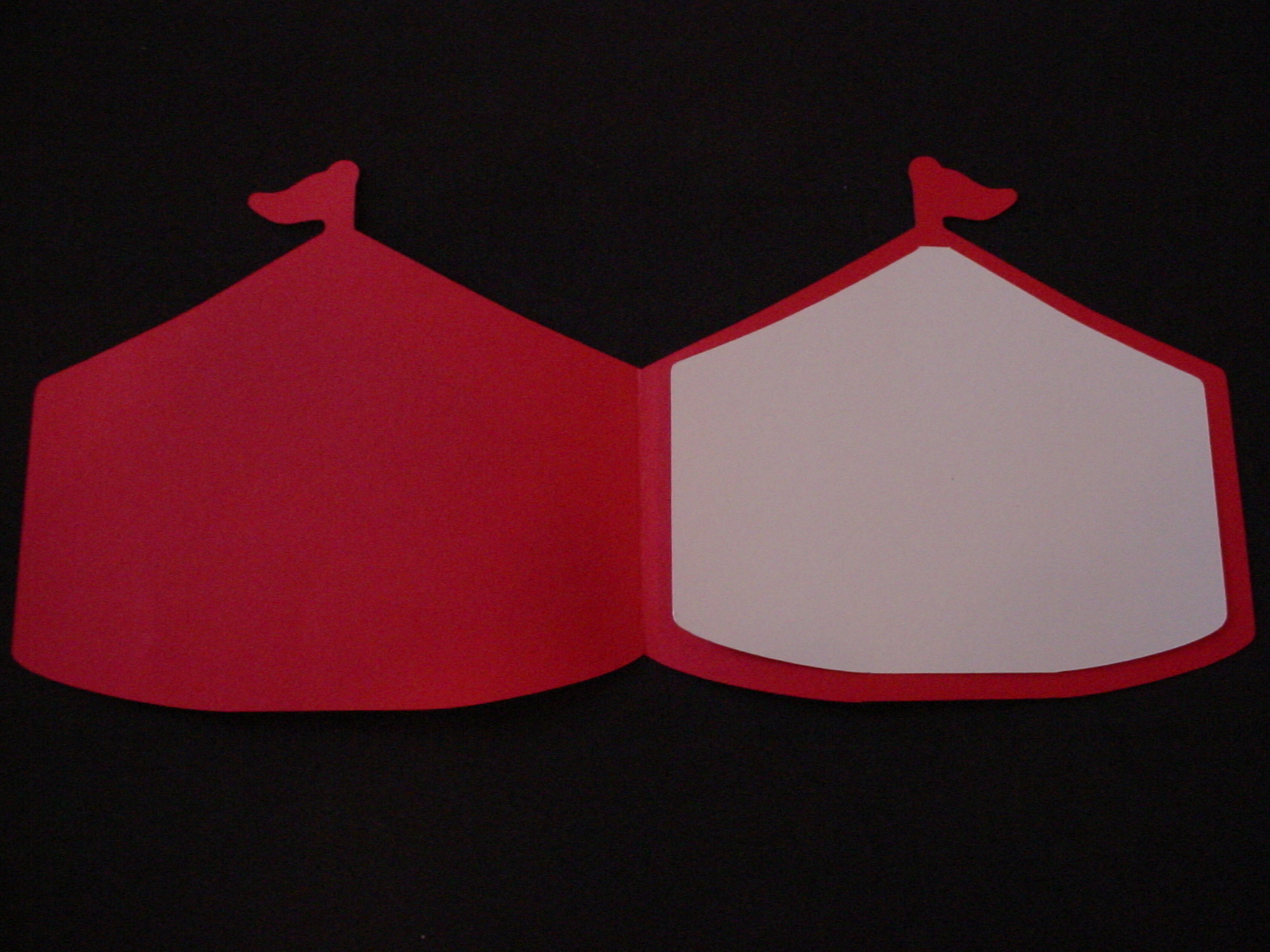
Anyway back to the Circus one more time! LOL One of the ladies at our school saw the circus decorations we made for our carnival and said "hey" I could use those for my son's birthday party and make it a circus theme and save lots of money! However, to do that, she wanted a circus tent invitation to send out and asked for my help in creating one for her to use.
| Open Card with Tent Insert |
| Open Card with Ticket Insert |
So, as not to let them sit around unused on my computer I am sharing my files here. SInce I used PC's Carousel Lite cartridges I only have files for Design Studio and the Gypsy available here at this time. If you really like this idea but don't have either Design Studio, a Gypsy and/or the Carousel Cartridge, I am sure that you can google circus tent and find some clipart to use to create a .svg for use with Make the Cut (MTC) or with Sure Cuts A Lot (SCAL) or whatever software and/or cutter you might have. You can also easily create a "ticket" by cutting out a rectangle and using a small circle punch on each of the four corners (cut a half circle on each corner). I haven't had time to try to find another circus tent image and create either a .mtc or .svg file myself sorry!
Download the Circus Tent Card/Invitation .cut file for DS using the Carousel Lite and George Cartridge.Download the Circus Tent Card/Invitation .gypsy file for Gypsy using the Carousel Lite and George Carts.
| This shows Fold and Glue Lines |
The file contains multiple pages, the first page cuts 2 red bases with the thumb tab, the second page cuts 4 of the white stripe overlays, the third page cuts 2 of the tent insert card, the fourth page cuts 4 of the ticket inserts, and the 5th page cuts 1 red base without the thumb tab for a traditional card that opens completely. To create the pull out card simple fold in the middle of the card lining up all sides. Then add a thin strip of glue or double stick tape to the top and right side of the card leaving the bottom open to pull out the insert.
| This shows "Closed Card" with Tent Pullout |
| "Closed Card" with Ticket Pullout |
Please feel free to leave me a comment especially if you have any questions on my files. If you do have a question, please leave me an e-mail address to contact you at. I will remove your address before publishing the comment. Thanks for stopping by.
Labels:
.cut file,
.gypsy file,
B-day,
card,
circus,
circus tent,
invitation,
ticket
Tuesday, October 26, 2010
Circus Images cut with Cricut and Blown-up Life Size
Yesterday I shared with you a .mtc and .svg file of a circus elephant balancing on a ball. Today, I wanted to show you what we did with him. We created large cutouts using plywood to decorate our carnival with Circus animals and performers. To do this, I cut out the shapes with my cricut as large as I could on a 12x12 mat. We then took those shapes and used an overhead projector to trace the images much larger onto plywood. We then used a saw to cut them out, we painted them and volia - great circus images decorating our school for our week long Greatest Webbfest on Earth celebration! The stars on the balls were cut using vinyl with my cricut. These pictures show the elephant I shared yesterday blown up and painted. We also used a lot of the images from the Lite Carousel Cartridge from PC. We created clowns, Lions, a Lion Tamer, Dancing Bears, a Circus train, a Circus Tent, a canon, popcorn boxes, ticket booth, large tickets, and more! Everybody loved them! Thanks for stopping by. Please feel free to leave a comment with any questions and I will get back to you as soon as I can.
Monday, October 25, 2010
Can You Say Circus?!? Circus Elephant on Ball - MTC or .svg File
Hello. Welcome to the Circus! I have been busy at my children's school the past few weeks helping make decorations for our annual carnival fund raiser "Webbfest" that we do each year. This year's theme was the Greatest Webbfest on Earth and was based on the Circus. I will show you several things that I did to help the decorations committee. This is the first one. This is from a coloring page we found simply by doing a google search for free circus coloring pages. I then used my Make the Cut software to pull it in and create a cut file for use with my Cricut machine. I have then used my MTC software to export it out as an .svg file for use by those who may use other software and/or cutters. (I took that .svg file and broke it apart in Inkscape and that is the file I am sharing here).
Isn't he cute?! If you would like my MTC file you can download it here. If you would like the .svg file, you can download it here. Sorry, but you cannot use .mtc or .svg files with Design Studio (DS) or the Gypsy. However, I will be showing you some cute things we made with the PC cartridge, Carousel, as well. I bought that cartridge specifically for us to use with our Carnival this year. Money well spent as we did LOTS of things with it. However, they really wanted an elephant on the ball like this one and there wasn't one on the cartridge. So, I quickly found this one and made the file and cut him out for them. They were amazed how easy it was to do!
Just a quick note: If you have been considering purchasing MTC, you might want to do so this week. A new and improved version of MTC is coming within the next few weeks and if you already own MTC, there is never a charge to upgrade. However, there are some significant new features that are being added as well as support for use with at least one other cutter and I suspect (have no actual knowledge of it however) that there might be a price increase coming with these new improved features. The software will still be worth the money with the new features being added BUT why pay more if you don't have too?
To find out more about Make the Cut go to their website here: http://www.make-the-cut.com/
Note: I am not affiliated with MTC and I do not get any money for others purchasing it. I am just a happy user who knows what all you can do with it and that even more is coming very soon. MTC and SCAL both are why I still have my Cricuts and didn't buy another cutter because they let me truly create as I want! However, since I still have my Cricuts, Gpsy, and DS I still buy cartridges thus a win-win for me and PC!
Isn't he cute?! If you would like my MTC file you can download it here. If you would like the .svg file, you can download it here. Sorry, but you cannot use .mtc or .svg files with Design Studio (DS) or the Gypsy. However, I will be showing you some cute things we made with the PC cartridge, Carousel, as well. I bought that cartridge specifically for us to use with our Carnival this year. Money well spent as we did LOTS of things with it. However, they really wanted an elephant on the ball like this one and there wasn't one on the cartridge. So, I quickly found this one and made the file and cut him out for them. They were amazed how easy it was to do!
Just a quick note: If you have been considering purchasing MTC, you might want to do so this week. A new and improved version of MTC is coming within the next few weeks and if you already own MTC, there is never a charge to upgrade. However, there are some significant new features that are being added as well as support for use with at least one other cutter and I suspect (have no actual knowledge of it however) that there might be a price increase coming with these new improved features. The software will still be worth the money with the new features being added BUT why pay more if you don't have too?
To find out more about Make the Cut go to their website here: http://www.make-the-cut.com/
Note: I am not affiliated with MTC and I do not get any money for others purchasing it. I am just a happy user who knows what all you can do with it and that even more is coming very soon. MTC and SCAL both are why I still have my Cricuts and didn't buy another cutter because they let me truly create as I want! However, since I still have my Cricuts, Gpsy, and DS I still buy cartridges thus a win-win for me and PC!
Friday, October 22, 2010
Backpack Box
A few months ago, Lariea posted on the "Make The Cut Forum" about these cute little backpack boxes that she had made. CaseysAngel(Christy) then went and found the pattern and directions on the Splitcoaststampers website. They were created and posted by Mary Arima on that site. Her blog is "PaperJoy". I couldn't resist making one. Actually, my plan was to make several as treat bags for my DD's volleyball team. However, they were a bit "fiddly" LOL and I decided there was no way I was making that many (it would have been more than 20 as she plays both JV and varsity!!) so this is a "one of a kind"!
Wednesday, October 20, 2010
Embossed Paper Birds - Project from JoAnn's
This project came from one of those free project sheets from JoAnn's. You can find the complete project information here at JoAnn's website. You will also find a better picture of the final project there as well. I took the pdf file provided and created a cut file for use with my electronic cutter. You can download the embossed paper bird .mtc cut file for use with Make The Cut here. You can download the embossed paper bird .svg file for use with other software and cutters here. Be sure to download the PDF file for assembly directions from JoAnn's site here. I used cuttlebug embossing folders to emboss the flower (dots) and the bird.
Subscribe to:
Posts (Atom)
.jpg)